 Spin-off of the University of Hasselt
English
Spin-off of the University of Hasselt
Follow the instructions below STRICTLY to download, install and register your CommArt downloadable module.
These instructions do NOT apply to ONLINE modules!
|
|
|
As there are many Operating Systems (OS) and browsers, it is possible that the following installation procedure is not successful. In that case: |
The standard installation process is in FIVE stages :
STAGES 1 + 2 +3:
Download the CommArt basic and registration software to your PC via the following link: /software/CommartInstaller.zip
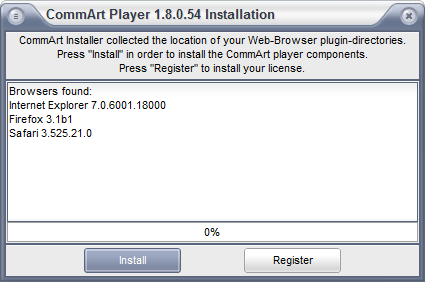
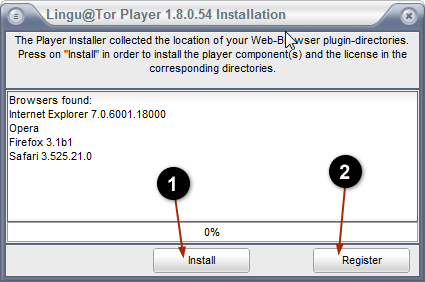
Step 1 (stage 2). Click “Install” to install the CommArt basic software (Lingu@Tor™ player)
Step 2 (stage 3). Click “Register” to register the personal and unique license key of your CommArt-module. Fill in your name, email address and personal license code in the relevant fields. Then press "Activate". Note: the Mastercode-field will be automatically filled in and should not be changed.
STAGE 4 + 5:
Carefully follow the instructions below to install and register your LinguaCom module and the associated Text-To- Speech (TTS) languages.
|
1.Download the required language file (click below on the desired language) |
|
|
2.Save this file on your hard drive, and 'unzip' the file to a folder of your choice |
|
|
3. Run the unzipped file (" xxx.exe ") by opening it. You may need to confirm that you want to open the file. Go through the installation process. Please note that starting the programme may take some time (half a minute), because of its size. |
Available language files (usually different voices (male and female voices) are available for every language) :
Intercultural communication for managers (Plurilingua series)
|
||||||||
| Module NL-FR | Module NL-DE | Module NL-EN | ||||||
| Module DE-FR | Module DE-PL | Module DE-NL | Module DE-EN | |||||
| Module SK-EN | ||||||||
| Module FR-DE | Module FR-EN | Module FR-NL | ||||||
| Module EN-DE | Module EN-FR | Module EN-NL | ||||||
| Module PL-NL | Module PL-DE | |||||||
| Module ES-NL | Module ES-EN | Module ES-FR | ||||||
| Module CZ-EN | ||||||||
| Module RO-FR | ||||||||
Languages for beginners
|
||||||||
| Module NL-RO | Module NL-SK | |||||||
| Module TR-FR | Module TR-NL | |||||||
| Module FR-TR | ||||||||
| Module RO-NL | ||||||||
| Module SK-NL | ||||||||
Day-to-day (Business) Communication |
||||||||
| AGK - Alltägliche (Geschäfts)kommunikation | ||||||||
With the necessary self-discipline, you will be surprised at the substantial progress you will make. And finally, if you are taking an exam or test, CommArt International wishes you the best of luck!
|
Problems with the registration of your license? Firewalls and other security software can interfere with the correct installation of your license. For other problems, please consult the FAQ. If this does not contain the solution to your problem, please do not hesitate to contact us via [email protected] |